Technical SEO audit service: what Google actually receives from your site
Good SEO audit services tell you what Google receives when it visits your site, not what you see in the browser. Mine gives you three things, in order: what's costing you visibility, what to fix first, and what already works, each with its proof.
Level 1 · in writing within five business days.I propose the price in writing after the free diagnostic, before we start.
Timeline
5 business days
I need
Search Console read access, if you have it
Delivery
Report + one-page summary
Session
30 to 45 minutes
Photo: Jon Tyson · Unsplash
Read it before you hire it
What does a technical SEO audit check?
Unlike SEO audit services that export a dashboard, a technical SEO audit checks six things, in the same order I explain them below. Each one comes with a real finding, the way I deliver it: finding, impact, proof, fix and expected result. It carries its priority and what stays pending if it can't be measured.
report.md · section 01Priority high
The crawler gets a different page than you do
It's the first thing I check on React, Vue or AI-built sites. When the browser assembles a page with JavaScript (the code that builds it), Google has to run that code to see the content. In my React app case study, Googlebot was receiving a title and an empty container.
On this site, the same URL requested as Googlebot and as Chrome returned 59,556 identical bytes (curl, measured on September 26, 2026). The long version is in the single page application SEO guide.
A real excerpt from work already done, written before the change was made. Below, which site it comes from.
FINDING
Without running JavaScript, each page carried 24 to 35 words of content.
IMPACT
Google had to run the code to see the page, and every empty page competed with the home page as one more copy.
PROOF
Screaming Frog without JavaScript · Jul 18, 2026
FIX
Serve every page complete from publication (prerendering).
EXPECTED RESULT
Google reads what you offer on every page. And those pages can compete for your customers' searches instead of passing as empty copies of the home page.
Pending if it can't be measured · If the server blocks the test request, it gets noted and Search Console's URL Inspection is used instead.
Entries in your sitemap (the list of your pages) that disagree with what the site serves. An accidental noindex (an order not to store it), and canonicals (the official version of the page) pointing elsewhere. Redirects: your site should have one version, on https and with or without “www”, and the others should lead to it in a single hop.
Soft 404s, too (pages that say “I exist” but don't), which Google explains how to avoid in single-page apps. And first of all, whether Search Console shows manual actions or security issues, which no live test reveals.
A real excerpt from work already done, written before the change was made. Below, which site it comes from.
FINDING
Redirects only existed in the browser: to the crawler, an old address answered “not found” (404).
IMPACT
Google kept showing the old address, and nothing reached the new one.
PROOF
curl with Googlebot's user agent · Aug 25, 2026
FIX
Real 301 redirects on the server and a real 404 for what doesn't exist.
EXPECTED RESULT
Whoever arrives at an old address, from Google or from a link, finds the new page instead of an error that sends them looking elsewhere.
Pending if it can't be measured · Without Search Console access, how many old addresses Google still shows stays pending.
A real excerpt from work already done, written before the change was made. Below, which site it comes from.
FINDING
The HowTo markup steps said “Step 1”, “Step 2” instead of the text the reader sees.
IMPACT
The markup didn't match the page, and Google asks you not to mark up what readers can't see.
PROOF
Served JSON-LD against each step's text · Oct 2, 2026
FIX
Every markup step carries its visible text, with an automated check guarding it on every release.
EXPECTED RESULT
Google and AI assistants receive the same information from your site that your customer sees, with no markup contradicting it.
Pending if it can't be measured · The Rich Results Test validates syntax, not truth: that gets compared by hand.
Real case: this very site.
report.md · section 05Priority medium
Numbers that don't survive a second run
Lighthouse's documentation (the engine behind that score) says much of the variability in a Performance score isn't caused by Lighthouse at all. I run it several times and report the median with its spread, against the Core Web Vitals (Google's user-experience metrics) thresholds.
A real excerpt from work already done, written before the change was made. Below, which site it comes from.
FINDING
Five back-to-back mobile PageSpeed runs, with nothing changed, scored 80 or 64; never anything in between.
IMPACT
With the first run alone, I'd have reported a drop that didn't exist.
PROOF
PageSpeed Insights mobile × 5 · September 2026
FIX
Run it five times, report the median with its range and look for what changes between runs.
EXPECTED RESULT
Decisions about your site's speed get made with stable numbers, and you don't pay to fix a drop that never happened.
Pending if it can't be measured · Without real-user data, it's stated as lab data.
Google uses links to find new pages and asks that every page you care about gets a link from at least one other page. The menu links everything, so it tells you nothing. What matters is which pages earn links from the content.
A real excerpt from work already done, written before the change was made. Below, which site it comes from.
FINDING
The “How I help” menu built its links only when opened.
IMPACT
In the HTML Google receives, the home page header carried no link at all to the service pages.
PROOF
View source of / and /en · Oct 2, 2026
FIX
Real <a href> links in the first response, with a menu that doesn't depend on being opened.
EXPECTED RESULT
Google reaches your service pages, the ones that bring you customers, from its first visit to the home page.
Pending if it can't be measured · Google being able to follow a link doesn't guarantee it stores the page.
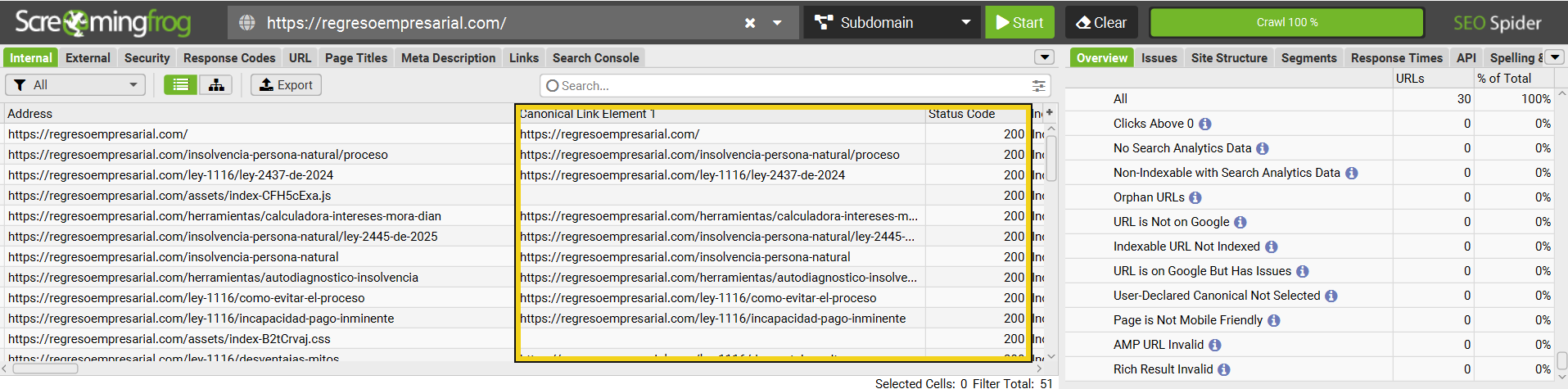
Every page: 200 and its own canonicalScreaming Frog · full crawl on Oct 15, 2026, 129 resources.Each problem and how it was solved is in the technical review (spreadsheet, in Spanish).I added the yellow box.
But keep in mind that, beyond explaining things to industry standards, my strength is listening to you.
These technical fixes, in the end, only ease the link between your content and the language search algorithms need. With that language they know how to show your material to your ideal customer.
So I invite you to think of it this way: technical SEO, done well, clears the road. But it's your content's job to turn interested people into customers, and to make that scale.
If you want to see how I work before you hire me, start here:
Start with the free diagnostic: in writing within two business days, with no sales call and no access required. If it makes sense to go further, the technical SEO audit takes it from there.
How does the free diagnostic differ from the technical audit?
The free diagnostic reviews the public side of your site. It tells you, in writing within two business days, which serious errors cost you visibility.
Free · 2 business days
Free diagnostic
What I checkThe public side of your site: what Google receives and which serious errors cost you visibility
What you getA written summary of the serious problems
What I needYour site's URL
PriceFree
TimelineTwo business days
Level 1 · 5 business days
Technical audit (Level 1)
What I checkThe public side, plus architecture, internal links, structured data, performance and Search Console
What you getA report with every finding, its impact and its fix, by priority
What I needRead access to Search Console, if you have it
PriceProposed in writing after the diagnostic
TimelineFive business days
The technical SEO audit covers the whole site, with access to Search Console if you have it. It's Google's free tool that shows how it sees your site. I give you every finding with its impact, its proof and its priority.
And what do you get compared with a paid SEO plugin?
A paid plugin usually gives you a score and a list of automated warnings, with the same rules for every site. It typically reads what's inside your content manager, not what Google receives.
And it doesn't tell you which warnings cost you customers and which you can ignore. That decision is left to you.
With the audit you get something else:
✓A review of what Google really receives, requesting your page the way Googlebot (Google's robot) does.
✓Every finding with its impact, its proof and its fix, ordered by priority.
✓Whatever I couldn't measure, written down as pending, with the reason.
✓A one-page summary, without jargon, for the person who decides, and a 30 to 45-minute delivery session.
Then there's nothing to audit yet. I'll design an SEO website for you from the first line, at a fixed price, in 15 business days: see SEO websites in the services menu.
I propose the price of my SEO audit services in writing after the free diagnostic, before we start. I deliver Level 1 in five business days. The diagnostic doesn't commit you to anything: if it makes no sense to go further, I'll tell you.
No. It works on what's public. For the audit, read access to Search Console helps, if you have it.
Yes, and that's where I check the most: on those platforms Google often receives something different from what the user sees.
Open your property in Search Console and go to Settings, Users and permissions, Add user. Enter the email I send you when we start and choose Restricted, which lets me see the data without changing anything. When the audit is done, you can remove it from the same place.
You or whoever runs your site: the report is written so a developer can turn it into tasks without a follow-up question. If you'd rather I stay with you, guided technical fixes are part of the monthly follow-up.
No. In Google's own words, no one can guarantee a #1 ranking. What I can promise is that you'll know what Google receives from your site and what to change first.