Single page application SEO: how Google reads your app and how to fix it
By Carlos Alberto Cardona B.· · reviewed on 12 min read

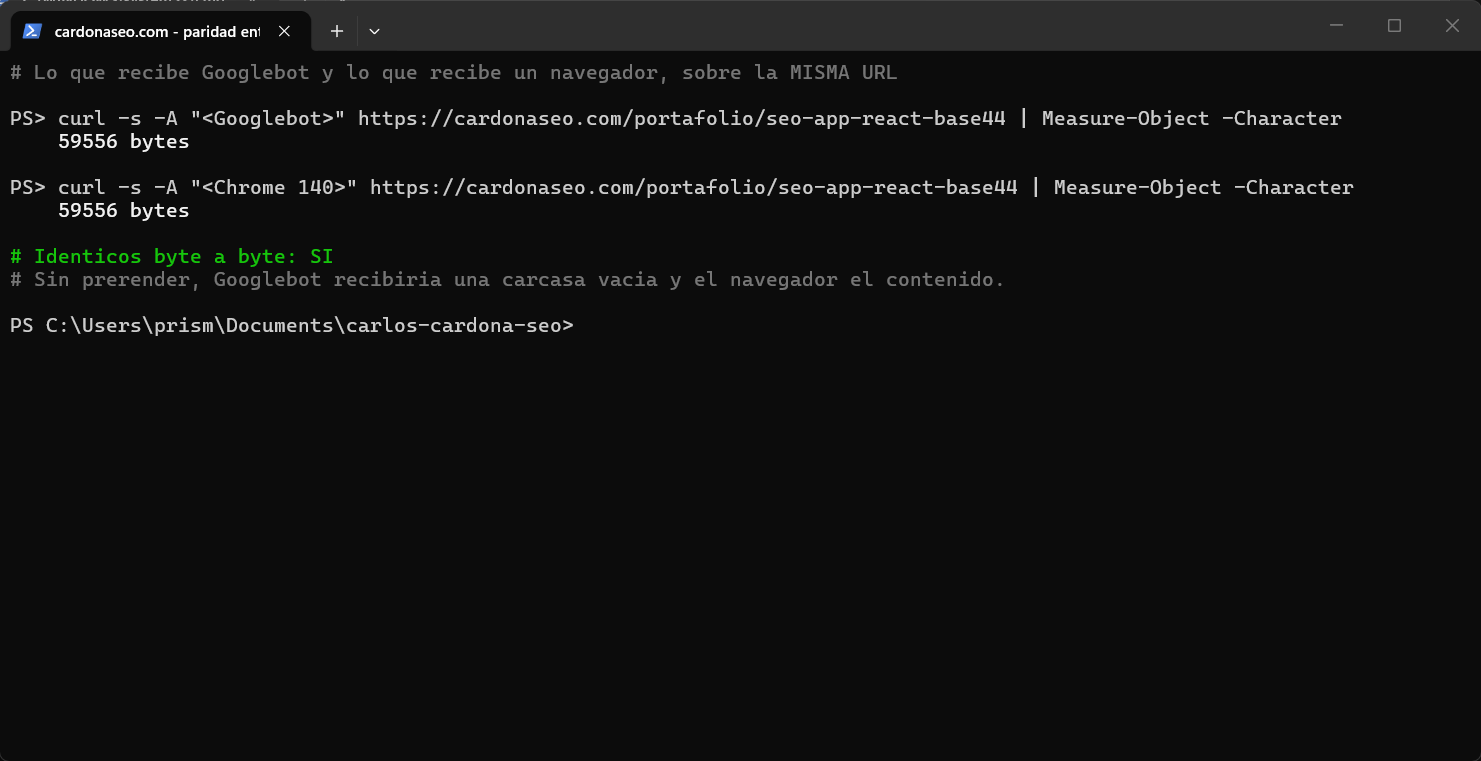
Single page application SEO depends on one thing: that Google gets your text in the first HTML, not after JavaScript runs. Prerendering at build time puts it there without leaving your platform; server-side rendering does too, but usually means migrating. Two commands tell you whether your app needs it; on Base44 and older Lovable apps, use URL Inspection.
The essentials
- What it is
- React and Vue apps, Base44 and many AI builders make sites that look finished in the browser but can reach Google as an empty page.
- Why it matters to you
- If your site answers with an empty shell, to Google every page is the same empty page. It isn't ranking badly: it has nothing to rank.
- What to do today
- Run this guide's first command on your site and count the words that come back, or give your AI assistant the ten-minute prompt below. If there are almost none, confirm it with URL Inspection before changing anything.
I learned this on the first site I measured, a family member's. It looked complete in the browser, but Google received 24 to 35 words per page (Screaming Frog without JavaScript, Jul 18, 2026). Today it's case study 1 in my portfolio.
If you have already spent credits asking your builder to “improve the SEO” and nothing changed, the problem isn't the prompt. It's what Google receives.
A single page application (one page that JavaScript fills in) looks complete in the browser and can reach Google empty. Google's own JavaScript SEO guide says pages wait in a render queue until Google's resources allow. It adds that server-side or pre-rendering is still a great idea, because not all bots can run JavaScript.
Every point comes with the command to check it on your own site. It comes from two Base44 sites I specified, measured and fixed with AI agents.
If the page still isn't there afterwards, the seven causes of a page not appearing walk you through it in order. The Search Console guide is where you watch it land.
Haven't built it yet? Start with how to build a website with AI.
SPA SEO: what Google gets from a single page app
React, Vue, Next.js in client mode, Base44 and many AI builders work the same way. They generate one nearly empty HTML file plus a JavaScript program that draws the content once it runs in the browser. Unless the platform serves crawlers something else, their first response is that empty file.
curl -s -A "Googlebot" https://your-site.com/services | head -c 400<title>Home</title><div id="root"></div>→ the home title and an empty container, on EVERY route

What do I check first? The five symptoms
I check what Google receives first, not what I see on screen. There are five symptoms: empty HTML, made-up URLs that answer 200, temporary redirects, a sitemap that contradicts the site and titles that don't match. The first one is the main one, and I always start there.
Empty HTML for the crawler: the command above returns a container with no text. It's the main symptom and the one Google's JavaScript guide deals with.
Made-up routes that answer 200: request a URL that doesn't exist and look at the status code. If it answers 200 with the home page, Google may treat it as a soft 404 or as a duplicate of the home page.
Temporary redirects where permanent ones belong: Google consolidates signals through a 301; a 302 tells it the move is provisional.
A sitemap that lists noindex or nonexistent pages: a sitemap should only carry indexable, canonical URLs. One that contradicts the site is worse than none.
Titles defined in three places that don't match: the platform's SEO panel, the code and the template. Google sees the one that arrives in the HTML. If it doesn't describe the page, it builds its own from the H1 or other text.
One trap the browser won't show you: if the first HTML carries a noindex and the app removes it on load, Google may never notice. According to its JavaScript guide, when it sees a noindex it may skip running the code at all. What counts is what View page source shows, not what the page displays.
curl -s -A "Googlebot" https://your-site.com/ | wc -w # words Google receivescurl -s -o /dev/null -w "%{http_code}" https://your-site.com/nope # must be 404curl -sI https://your-site.com/page/ | grep -i "HTTP\|location" # 301 to the URL without slashcurl -s https://your-site.com/sitemap.xml | grep -c '<loc>' # how many URLs?curl -s -A "Googlebot" https://your-site.com/ | grep -o "<title>.*</title>"
From the browser · 2 min
What Google receives from your page
Why it matters: What you see on screen may not be in the code Google receives first. If the text only shows up when the browser assembles the page, Google depends on a second pass to read it.
It's the difference between assembled furniture and a flat-pack box. The assembled piece can be judged at a glance; the box, whenever someone has time to put it together. What arrives in the page source is the assembled piece.
Whether the crawler gets your content or an empty container. It's the first thing I check on any site, and the one that can change the whole diagnosis the most. Why it happens so often on AI-built sites: what Google actually gets from a single page app.
- 1.
Open your site in the browser.
- 2.
Right-click → “View page source”. A tab full of text opens: that's what Google receives before anything runs.
- 3.
Press Ctrl+F (Cmd+F on Mac) and search for
<h1.
What comes out tells you which of these cases you're in.
Your headline is there.
Google is receiving it. Your page is getting through.
There's no
<h1>at all, and the whole source fits in two screens.Google receives an empty container. You see a finished page because your browser assembles it; the crawler doesn't.
There's an
<h1>, but it isn't yours.It says “Home”, “Welcome” or the template name. Google does receive a page: the template's, not the one you wrote.
Ask your AI assistant: the prompt to copy
Open it in your browser's side panel (Claude, Gemini or ChatGPT), with your page open, and replace what's in brackets. The rules at the end make it quote what it saw and say “not verifiable” instead of making things up.
Open this page: [your page address].Tell me the H1, the H2s and the first paragraph you see.Here is a fragment of “View page source” for the same page: [the text from “<h1” to “</h1>” and the paragraph after it; or write “no <h1> appeared”].Compare the two and tell me whether the text I see on screen is also in the code.Rules for this review:1. Quote the exact text you found. Don't paraphrase it.2. If something can't be seen from the browser, write “not verifiable from the browser.” Don't assume.3. Give me a table: element · what you found · fine / review / missing · why it matters in one sentence.4. Don't make up traffic, visits or rankings. Don't promise anything will rank higher on Google.5. If you can't open an address yourself, say so in the first line and work only with what I pasted. Don't describe a page you didn't see.
What this check does NOT prove: This looks at one page, not the site, and at the first response. Google may run the JavaScript afterwards, in a second pass with limited resources, and sometimes it does.
When it's no longer a do-it-yourself job: the page source doesn't contain your text and your platform has no setting to change that. I'll review your site for free and send it to you in writing.
From the browser · 3 min
The same thing, asking Google itself
Why it matters: If Google can't see the text on your page, it has nothing to show when someone searches for what you sell. Many AI-built sites assemble the text in the browser, and Google has to take an extra step to see it.
Whether Google manages to see your page after assembling it. The first check looks at what arrives before; this one looks at what Google ends up seeing, with Google's own tool. That tool shows two versions that shouldn't be mixed up: what URL Inspection really tells you.
- 1.
In Search Console, open URL Inspection and paste your page address.
- 2.
Click “Test live URL” and wait for the result.
- 3.
Open “View tested page” and open the “Screenshot” tab.
What comes out tells you which of these cases you're in.
The screenshot shows your page, with your text.
Google can see it. If the first check also found your headline in the page source, Google doesn't depend on a second pass to read it.
The screenshot is blank, or shows only the menu.
Google isn't seeing your content. To the search engine, your page says much less than you think.
The tool says the URL isn't on Google.
It may simply not have discovered it yet. Run the sitemap and noindex checks before concluding anything.
Ask your AI assistant: the prompt to copy
Open it in your browser's side panel (Claude, Gemini or ChatGPT), with your page open, and replace what's in brackets. The rules at the end make it quote what it saw and say “not verifiable” instead of making things up.
Open this page: [your page address].Tell me the H1 and the first paragraph you see.Here is what the screenshot in Search Console's “View tested page” shows: [describe it, write “it's blank” or write “I don't have access to Search Console”].Compare the two and tell me whether Google is seeing the same thing I see.Rules for this review:1. Quote the exact text you found. Don't paraphrase it.2. If something can't be seen from the browser, write “not verifiable from the browser.” Don't assume.3. Give me a table: element · what you found · fine / review / missing · why it matters in one sentence.4. Don't make up traffic, visits or rankings. Don't promise anything will rank higher on Google.5. If you can't open an address yourself, say so in the first line and work only with what I pasted. Don't describe a page you didn't see.
For whoever runs your site: the terminal version
curl -s -A "Googlebot" https://your-site.com/ | wc -wcurl -s -o /dev/null -w "%{http_code}" https://your-site.com/does-not-existcurl -sI https://your-site.com/sitemap.xml
(Invoke-WebRequest -Uri "https://your-site.com/" -UserAgent "Googlebot").Content.Split().Count(Invoke-WebRequest -Uri "https://your-site.com/does-not-exist" -SkipHttpErrorCheck).StatusCode(Invoke-WebRequest -Uri "https://your-site.com/sitemap.xml" -Method Head).Headers
The first command counts the words Google receives: hundreds on a page with its text, a few dozen, mostly tags, on an empty container. This site's empty index.html gave 81 on October 2, 2026; the second command should return 404, and its -SkipHttpErrorCheck needs PowerShell 7 or later. There are two variants because grep isn't on Windows and, in Windows PowerShell 5.1, curl is an alias for Invoke-WebRequest without -s or -A.
What this check does NOT prove: The screenshot comes from one test visit, made today: it doesn't guarantee Google sees it the same way on every crawl. Nor does it show the status code, which is in the HTTP headers under “View tested page” → “More info”. If you can't read them, the terminal version, folded here for whoever runs your site, gives it in one line.
When it's no longer a do-it-yourself job: the screenshot comes out blank and your platform has no setting to change how it serves the page. I'll review your site for free and send it to you in writing.
From the browser · 1 min
Whether your site has a real 404
Why it matters: If any invented address shows your home page, Google can store pages that don't exist and waste crawl time on them. A page that doesn't exist should answer with a 404 status, not with the 200 that means “all good”.
A real 404 is the doorman who says “nobody lives here”. If any invented address gets shown into the main living room, the mail carrier ends up delivering letters to houses that don't exist.
What your site does with a nonexistent address: platforms that assemble the page in the browser often answer “all good” and show the home page. Google may treat that as a soft 404 (a false “not found”) or as a duplicate of the home page. If that's you, see how to fix an AI-built site without leaving your platform.
- 1.
Type your domain in the address bar followed by something invented:
your-site.com/this-does-not-exist-12345. - 2.
Look at what appears.
- 3.
Then right click → “View page source” and search for
<title: it tells you which page the server thinks it gave you.
What comes out tells you which of these cases you're in.
A page saying it doesn't exist, with links back.
Good. What is left is checking it also answers with status 404. That doesn't show on screen: the Network tab of the browser's developer tools (F12) does, in the “Status” column when you reload the page.
Your home page, with its normal content.
Your site is saying “this page exists” for any address anyone mistypes or mislinks. Google can index copies of your home page under addresses you never created.
A blank screen or a platform error.
Visitors bounce, and the crawler doesn't know what to do with it either.
Ask your AI assistant: the prompt to copy
Open it in your browser's side panel (Claude, Gemini or ChatGPT), with your page open, and replace what's in brackets. The rules at the end make it quote what it saw and say “not verifiable” instead of making things up.
Open this address, which doesn't exist on purpose: [your domain]/this-does-not-exist-12345.What do you see: a page-not-found notice, my home page or another page? Quote the title and the first visible text.If the browser's Network tab showed me the status code, here it is: [code, or write “I don't know”].Rules for this review:1. Quote the exact text you found. Don't paraphrase it.2. If something can't be seen from the browser, write “not verifiable from the browser.” Don't assume.3. Give me a table: element · what you found · fine / review / missing · why it matters in one sentence.4. Don't make up traffic, visits or rankings. Don't promise anything will rank higher on Google.5. If you can't open an address yourself, say so in the first line and work only with what I pasted. Don't describe a page you didn't see.
What this check does NOT prove: From the browser you see the screen, not the status code. A page that says “not found” and answers 200 is still a false 404 to Google.
When it's no longer a do-it-yourself job: the invented address shows your home page and your platform doesn't let you set up the error page. I'll review your site for free and send it to you in writing.
From the browser · 3 min
Whether an old URL leads to the new one, in a single hop
Why it matters: If you changed a URL and the old one doesn't permanently redirect to the new one, Google doesn't carry over what it had earned. And anyone arriving through an old link hits an error. A clean move answers 301, once, with no layovers.
What your site answers when someone asks for an old URL or a variant: with or without “www”, with “http” or with a trailing slash. It should lead to one version, with a 301, in a single hop. On this very site, “http://” reached the right version in two hops and “http://www” in three (curl, September 15, 2026).
- 1.
Install the free Redirect Path extension, by Ayima, in Chrome.
- 2.
Type each variant of your home page in the address bar: with “www”, with “http://” and with a trailing slash on an inner page. If you changed a URL, type the old one too.
- 3.
Click the extension icon: it shows each hop with its status code. No extension: F12 → “Network” tab, check “Preserve log” and reload; the “Status” column gives the same answer.
What comes out tells you which of these cases you're in.
One hop, with a 301 or 308, to the URL the rest of the site uses.
Good. Google knows which one counts and passes along what the old one had.
There's a 302 or a 307.
That's a “temporary” move: Google doesn't use it as a signal that the new URL is canonical, and usually keeps showing the old one. If the change is permanent, it should be a 301: it's one of the five symptoms I check first on an AI-built site.
Two or more hops in a row (say http → https → no www).
It works, but every hop is one more layover. Each variant should go straight to the final URL.
The old URL returns a 404 or shows the home page.
There's no move: what the old URL earned is lost. If it shows the home page, Google may treat it as a soft 404 (a false “not found”).
Ask your AI assistant: the prompt to copy
Open it in your browser's side panel (Claude, Gemini or ChatGPT), with your page open, and replace what's in brackets. The rules at the end make it quote what it saw and say “not verifiable” instead of making things up.
These are the redirects I saw with the Redirect Path extension (or in the Network tab): [for each URL: what I typed → each hop with its status code → where it ended].For each one, tell me how many hops there were, whether any is temporary (302 or 307) and whether the final destination is the version I use everywhere else (with or without www, with or without a trailing slash).If a 307 only changes http to https on the same address, don't count it as temporary: it's usually Chrome's HSTS memory, not my server; tell me separately.Use only what I pasted; if a hop is missing, say so.Rules for this review:1. Quote the exact text you found. Don't paraphrase it.2. If something can't be seen from the browser, write “not verifiable from the browser.” Don't assume.3. Give me a table: element · what you found · fine / review / missing · why it matters in one sentence.4. Don't make up traffic, visits or rankings. Don't promise anything will rank higher on Google.5. If you can't open an address yourself, say so in the first line and work only with what I pasted. Don't describe a page you didn't see.
What this check does NOT prove: It checks the URLs you type, not every URL on the site. And Search Console's live test (“Test live URL”) won't do for this. Google says it follows redirects without telling you which ones or showing the final URL.
When it's no longer a do-it-yourself job: there are temporary hops or multi-step chains and your platform doesn't let you set up redirects. I'll review your site for free and send it to you in writing.
From the browser · 3 min
Whether Google can follow your menu links
Why it matters: Google reaches your pages by following links. If your menu or buttons go to another page without being a real link, Google may never reach those pages. The same goes if the links only show up when someone opens a dropdown.
Whether your site's paths are built for a robot to walk; Google only reliably follows links written as <a href>. Buttons that navigate with code, or links that appear when a menu opens, can be left out. It happened on this very site: until October 2, 2026, the “How I help” menu built its links when opened, and Google didn't receive them.
- 1.
Hover over each menu option and button: if it's a link, the browser shows the address in the bottom-left corner.
- 2.
Right-click each one: a link offers “Open link in new tab”; a button doesn't.
- 3.
Right-click → “View page source”, Ctrl+F and search for a menu page's address, say “/services”. If it isn't there, the link doesn't arrive in the first response.
What comes out tells you which of these cases you're in.
Every option shows its address and appears in the page source.
Good: Google can follow your site's paths from the first HTML. Next comes reviewing the links inside your text.
It shows the address on hover, but it's not in the page source.
The link only exists after the page is assembled, or when the menu opens. Google depends on a second pass to see it, and inside a dropdown it may never see it.
No address and no “open in new tab” option.
It's a button that navigates with code. It's the same to you; Google doesn't reliably follow it.
Ask your AI assistant: the prompt to copy
Open it in your browser's side panel (Claude, Gemini or ChatGPT), with your page open, and replace what's in brackets. The rules at the end make it quote what it saw and say “not verifiable” instead of making things up.
Open [your page address].List every menu item, every footer item and every button that leads to another page. For each, say whether it's a link with a destination address (quote the address) or a button with no address.Here is what I found searching for “href” in View page source for that same page: [paste the lines, or write “didn't find them”].Is there any menu page that doesn't appear as a link in the page source?Rules for this review:1. Quote the exact text you found. Don't paraphrase it.2. If something can't be seen from the browser, write “not verifiable from the browser.” Don't assume.3. Give me a table: element · what you found · fine / review / missing · why it matters in one sentence.4. Don't make up traffic, visits or rankings. Don't promise anything will rank higher on Google.5. If you can't open an address yourself, say so in the first line and work only with what I pasted. Don't describe a page you didn't see.
What this check does NOT prove: Hovering and right-clicking are good signs, not proof: what counts is how it's written in the code. And Google being able to follow a link doesn't mean it'll keep the page: the indexing report tells you that.
When it's no longer a do-it-yourself job: the page source doesn't carry important menu pages as links, and your platform won't let you change it. I'll review your site for free and send it to you in writing.
How do you fix it without leaving your platform?
You don't need to rewrite the site or leave your platform. You need the HTML in the first byte to carry the content, and something in front of the site that answers real 404s and 301s. It takes four pieces:
Prerender: at build time, generate one HTML file per route with the real text, the metadata and the structured data. Google reads the page without executing anything. If an H1 doesn't match or code leaks in, the build fails.
A Cloudflare Worker (a small program in front of the site) as a custom domain. It rewrites each route to its prerendered HTML, returns a real 404 for anything outside the manifest and handles the 301s. Cloudflare documents Custom Domains.
One source of truth for titles, descriptions and structured data, in the code, with an automated check that warns if any copy drifts.
Verification in production with the Googlebot user agent after every publish, and Google's URL Inspection to confirm what it actually indexed. What a dashboard says isn't evidence; the server's response is.
If you can't put anything in front of your site, Google accepts two ways out for URLs that don't exist in a single page app. One: the app sends those URLs to a page that answers a real 404, say /not-found; two: your error page carries a noindex tag.
You can ask your AI builder for either, and then confirm it with the 404 check.
If you ask your builder: one change, and nothing else
An AI builder in a hurry fixes one thing and touches three. This is the order I follow when I hand a change to my agents, cut down to what you need:
I want one single change on my site: [what to change, in one sentence].Where: [page or section].Already decided, don't touch it: [for example, the headline text].Before changing anything, tell me what you'll touch and wait for my “yes”.If you can't do it exactly like this, stop and tell me; don't solve it some other way.When you're done, tell me what else changed, however small, and how I check it worked.Rules: don't report anything as done that you didn't do. If you can't open or edit that page, write “I couldn't open [page]” in the first line and change nothing.
Then run the check that found the problem again. If it comes out the same as before, the change didn't land, whatever the builder says.
If your builder promises “SEO included,” check what it includes in what Google receives, not in the editor's panel. While your site arrives empty, every month it's live is a month Google has nothing of yours to show. That's why the free diagnostic starts there, in writing within two business days.
React SEO without Next.js: SSR, prerendering, and what to do if you can't migrate
A single page application isn't bad for SEO by itself: the problem is text that arrives late. What decides it is who builds the HTML, and when: each visitor's browser, your server on every request, or your build before you publish.
Google runs JavaScript, but its JavaScript SEO guide says server-side or pre-rendering is still a great idea. The page gets faster for users and crawlers, and not all bots can run JavaScript. These are the three ways to build the HTML:
| Item | Who builds the HTML | When it fits | What to watch |
|---|---|---|---|
| Browser only (plain SPA) | Each visitor's browser, when the JavaScript runs | Apps behind a login, where SEO doesn't matter | The first response carries an empty container for Google and for assistants |
| Server-side rendering (SSR) | Your server, on every request | Sites with many pages, or that change daily | It needs a server that runs code; switching to it usually means migrating |
| Prerendering at build time | Your build, once per route, before publishing | Service sites with a few pages that change when you publish | That every route gets its HTML and none is left out |
Vercel and MERJ measured it in 2024, across more than 100,000 Googlebot fetches. On nextjs.org, Google fully rendered every indexable HTML page; half waited 10 seconds or less, and some waited hours. In other words, Google does read the JavaScript, just late.
AI assistants are another story. In December 2024, the same team reported that “none of the major AI crawlers currently render JavaScript.” The exceptions it names are Gemini, which uses Googlebot's infrastructure, and AppleBot.
If showing up in their answers matters to you, that's what AI SEO covers.
React without Next.js: you don't have to migrate
If your site is React without Next.js, you don't need to switch frameworks for Google to receive the text. This site is React with Vite on Base44: every build generates one HTML file per route with the text, the metadata and the structured data. And the build fails if an H1 doesn't match.
I specified it, generated it with Claude Code, and verify it in production after every publish.
Rebuilding carries its own risk: when Pinterest rebuilt its pages, its SEO traffic took a few weeks to get back on par. Tags such as the H1 and the canonical were missing, according to its engineering blog (Mar 3, 2017). In the end it measured 40% less wait time, 15% more SEO traffic and a 15% higher signup conversion rate.
If you can't migrate or touch the build
Measure what Google receives today first, with the live test in URL Inspection. Your platform may already hand the content to crawlers, and there may be nothing to fix.
If you can put something in front of the site: a Worker that serves the prerendered HTML and answers real 404s and 301s. It's in the previous section.
Lovable says it prerenders only for crawlers on apps created before May 13, 2026 (June 22 on Enterprise plans). If your platform does that, it fits what Google calls dynamic rendering. Google describes it as a workaround, not a long-term solution: check it again after every big change.
If you can't do any of that, ask your builder for Google's two ways out for URLs that don't exist, from the previous section. They don't fix the empty content, but they stop made-up URLs from competing with the real ones.
Lovable and Base44 SEO: check what Google receives, whatever your builder does
Not every builder serves the empty shell you see in View page source. Lovable apps created before May 13, 2026 do; newer ones, according to Lovable, arrive rendered from the server. Base44 did when I measured it, between July and September 2026.
So I won't tell you Google can't see your site: I'll tell you to check what it receives, whatever your builder does.
I measured Base44 on two sites, and today it doesn't serve what it served then. Its documentation, read on Oct 18, 2026, says it serves crawlers a rendered version of each page. If that version isn't ready yet, it serves a short summary with the heading, the description and links.
That same day I requested nine routes of this site as Googlebot, on its free Base44 address and without the Worker. Six arrived complete; three came with a generic title and the home page text, and a made-up URL answered 200. In a regular browser, the three inner pages I tried showed the home page text.
Base44 says its SEO is designed for a custom domain, so yours may differ. That's why, on Base44 as on Lovable, View page source isn't enough: the test that counts is URL Inspection.
On Oct 18, 2026, its automatic sitemap and llms.txt included two pages this site marks noindex in its code: /gracias and /privacidad. According to its documentation, the dashboard lets you remove them from the sitemap one by one. With a prerender and a Worker in front, it's fixed.
According to Lovable's own documentation, re-read on Oct 18, 2026, apps created since May 13, 2026 are rendered on the server. Older ones get a pre-rendered version served only to verified crawlers such as Google's.
On those older apps, curl with a Googlebot user agent and View page source both show the empty shell, even if Google gets the content. So the test that counts there is the live test in URL Inspection, which Google runs from its own machines.
If Search Console lists your pages as “Discovered - currently not indexed” or “Crawled - currently not indexed”, those are different problems with different fixes. With the first, Google hasn't visited the page yet; with the second, it visited and didn't keep it. On an app that serves a near-empty page, that second status is the first thing I check.
The difference and what to do in each case are in the seven reasons a website doesn't show up on Google. It also explains why resubmitting the sitemap doesn't fix it.
No site yet, or about to rebuild it? I can build it with all of this solved from day one: see the SEO website design service. But first, see what a website costs if you hire someone.
What I don't claim
I haven't measured Lovable, Next.js in server mode or Webflow with this exact method, so I don't compare them. When I do, this section will say what their server answers to Googlebot, with a date.
If you'd rather have me check it, the free diagnostic starts with exactly these five symptoms. How I work, including what I never change without approval, is in the portfolio. Once Google receives your site, setting up Google Analytics 4 tells you whether it brings in inquiries.
Fixing the render is the first step, not the last one. Once the crawler receives your HTML, the next questions are what it does with it: indexation, canonicals, structured data. Those are what a technical SEO audit covers.
And it's the same first step for AI answers: a page whose content never reaches the served HTML can't be cited by an assistant either. Which of the three layers you're failing, and which two you can check today, is in the guide on appearing in AI Overviews.
Watch it explained, by the people who built it
Two short videos from Google's own channels. They're the same source the links above point to, in video form:
How Google Search indexes JavaScript sites · Google Search Central, 2019, 3 minutes. The opening episode of the official JavaScript SEO series.
When does JavaScript SEO matter? · Google Search Central, 2019, 4 minutes. What counts as a “JavaScript site” and when rendering becomes your problem.
Frequently asked questions
Make every URL reach Google with its text in the first HTML. Prerendering at build time or server-side rendering does that. Then made-up routes must return 404, redirects must be 301s and the sitemap should only list indexable pages.
Not by itself, but Google renders JavaScript in a second pass, once its resources allow. Its JavaScript guide still calls server-side or pre-rendering a great idea. If nothing builds the HTML first, the crawler can get an empty shell.
Server rendering or prerendering puts the content in the first HTML. Google's JavaScript guide still calls that a great idea, because not all bots run JavaScript. Prerendering at build time does it without rebuilding the app, and it's the fix this guide describes.
According to a December 2024 study by Vercel and MERJ, the crawlers of OpenAI, Anthropic, Meta and Perplexity didn't run JavaScript. Gemini, which uses Google's infrastructure, did. If your text isn't in the first HTML, an assistant may miss it; prerendering serves both Google and the assistant.
Yes. Prerender, a Worker in front, one source of truth for titles and verification in production fix it without changing builders.
It works for one main search, as long as its text arrives in the HTML. If you offer three services people search for separately, as I see it a single page competes for all three and usually falls short. Don't confuse it with a single page application: that's a way of building a site, and it can have many URLs.
No: watching it load proves nothing, because your browser assembles the page even when Google receives an empty container. A draft check for this site, written with AI, said exactly that; it was corrected when tested, on September 27, 2026. The check that works: search Google, in quotes, for a sentence from an inner page; if your page comes up, Google has that text.
Sources
Article reviewed on October 18, 2026. Each date is the source's last published update.
See the 17 sources
- 01How Google Search indexes JavaScript sites · Google Search Central · video
- 02When does JavaScript SEO matter? · Google Search Central · video
- 03JavaScript SEO basics · Google Search Central
- 04Dynamic rendering as a workaround · Google Search Central
- 05HTTP status codes, network and DNS errors (soft 404) · Google Search Central
- 06Redirects and Google Search · Google Search Central
- 07Build and submit a sitemap · Google Search Central
- 08How to specify a canonical with rel=canonical and other methods · Google Search Central
- 09Introduction to structured data markup · Google Search Central
- 10Custom Domains for Workers · Cloudflare Docs
- 11URL Inspection Tool · Google Search Console Help
- 12Optimize your app for SEO and AI search · Lovable Documentation
- 13SEO and search visibility (read on Oct 18, 2026) · Base44 Docs
- 14Influencing your title links in search results · Google Search Central
- 15How Google handles JavaScript throughout the indexing process (Jul 31, 2024) · Vercel · Giacomo Zecchini, Alice Alexandra Moore, Ryan Siddle and Malte Ubl
- 16The rise of the AI crawler (Dec 17, 2024) · Vercel · Giacomo Zecchini, Alice Alexandra Moore, Malte Ubl and Ryan Siddle
- 17Driving user growth with performance improvements (Mar 3, 2017) · Pinterest Engineering · Sam Meder, Vadim Antonov and Jeff Chang
About the author. Carlos Alberto Cardona B., SEO specialist in Bogotá. I write what I measure, with every number next to its instrument and date, and I verify what AI executes myself.