How to build a website with AI, step by step (and what AI won't decide for you)
By Carlos Alberto Cardona B.· 12 min read

When you build a website with AI, the tool is the easy part; Lovable, Base44 or Claude Code can design one in an afternoon. The hard part is deciding which pages it will have, which search each one answers and how they link to each other. That takes eight steps, from studying your competitors to measuring what happens next.

The essentials
- What it is
- AI designs fast. What it doesn't decide for you is which pages your business needs and which search each one answers.
- Why it matters to you
- The golden rule: one URL, one keyword, one intent. That way your pages don't compete with each other.
- What to do today
- Before you publish, check that Google receives the text. After that, measure and adjust.
I know because that's how I build my own site. I pay for Claude, and it saves me a huge amount of time, but what it has taught me most isn't technical: it's patience.
A good website, in design and in SEO, comes out of many rounds of conversation with the AI. Everyone has to learn to work with their own. My own site is still at the stage where I put in more than I get back.
If what you need is to see how the tool works, YouTube has good tutorials, and I list the ones I recommend below. This guide covers what those videos almost never explain: site architecture and internal linking.
What's the hard part of building a website with AI?
The hard part isn't the design: it's the architecture. A website built with AI can look finished and answer no search at all, or have three pages competing for the same one. Knowing which pages to make, with which keyword each and how to link them, is what decides whether anyone finds it.
The most common mistake is asking the AI to "make me a website for my business". You'll get something pretty, with generic sections nobody searches for.
The hardest part for me was getting the AI to build what I had in my head. Along the way I had to learn a lot of technical SEO: things I never imagined mattered for building a website.
The alternative is to come to the AI with the groundwork done. That means knowing what your competitors do, what your customers search for and which URL answers each thing. With that, the AI stops guessing.
How do you build a website with AI, step by step?
In eight steps: study your competitors, research what your customers search for, make a keyword map and write in their words. Then choose your AI and design, ask for a build plan, connect Search Console and measure. The first four don't need any AI design tool, and they're the ones people skip most.
Step 1. Study your competitors: what does the ideal website look like?
Search Google for what you sell, with your city if it's a local service, and open the three or four websites at the top. Don't copy them: study them. Notice which pages they have, which service goes on each and how they link to each other.
That's your starting "ideal website". If the sites that already rank have one page per service, it's a hint of what Google understands people are looking for.
An example from my competitor sheet, read on Oct 15, 2026: Diego González, an SEO consultant in Cali, Colombia, has a consultant page for each city (Bogotá, Medellín, Barranquilla, Cartagena, Pereira). He also offers a free SEO return calculator.
That tells me two things: his architecture targets local searches, and he gives away something useful to capture leads.
Step 2. Research what your customers search for on Google and in AI
Now find out which words your customers use to search, on Google and in assistants like ChatGPT or Claude. The words tell you which product they want, which rung of your value ladder they're on and what language your page needs to reach them.
A tool like Dinorank or Google's Keyword Planner gives you the volume of each search. Write down the tool and the date: the numbers change.
Step 3. Make a keyword map: one URL, one keyword, one intent
With those searches, make a map: every URL you plan to create gets a single primary keyword and a single search intent. Intent is what the person wants to achieve: learn, compare or hire. Secondary keywords go along with the primary one; they never replace it.
You do this mainly to avoid cannibalization: two of your pages competing for the same search. What tends to happen is that Google alternates between them, and neither settles into a good position.
Neil Patel puts it plainly in his guide to keyword cannibalization: "Prevent keyword cannibalization going forward with a keyword map that assigns one primary keyword and intent per URL."
One nuance: it isn't cannibalization if the two pages answer different intents. That's why the map assigns a keyword and an intent, not just a keyword.
Here's how the map for this site is built, for example. I keep it in a spreadsheet, "Estudio SEO", with one tab for keywords and another for competitors:
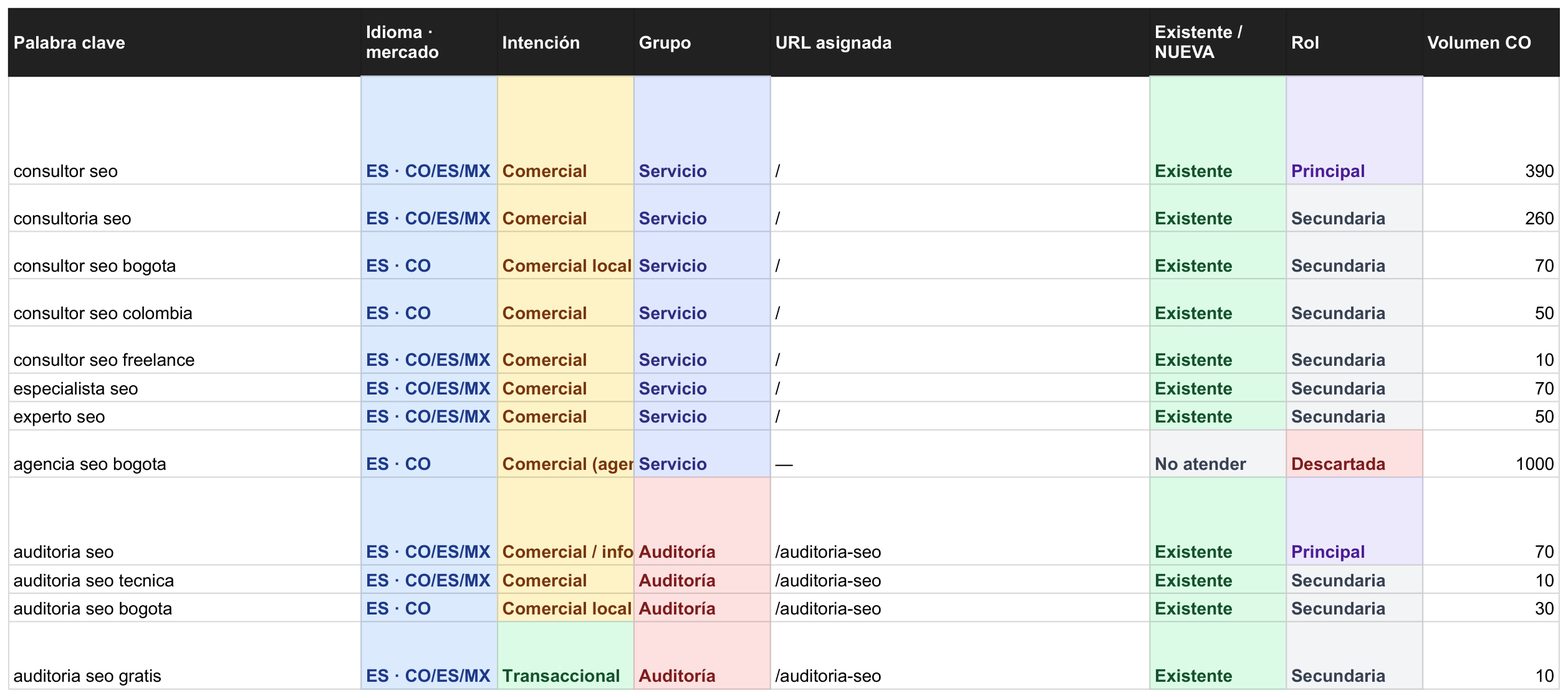
My keyword map, in the spreadsheet I run the site from (data from Oct 15, 2026, Google Ads volumes via DataForSEO). Each URL has a single primary keyword; the rest of its group are secondary.
That's why “consultor seo” and “auditoria seo” live on different pages; they're different intents. And I discarded “agencia seo bogota”, even though it has more volume than any of them. I'm not an agency, and that page wouldn't answer the person searching for it.
| URL | Primary keyword | Intent |
|---|---|---|
| /en/seo-website-design | seo website design | Hire |
| /en/blog/how-much-does-a-website-cost | how much does a website cost | Compare prices |
| /en/guides/google-business-profile | how to set up a google business profile | Learn how to do it |
The map also decides the internal linking: each page links to the one the reader needs next. For example, the article on how much a website costs links to the design page, because people comparing prices often want to hire next.
Step 4. Write in your customers' words
Your customers aren't looking for "a website": they're looking for how to get more clients or sell better. That's why I don't lead with a website; I lead with a client acquisition channel. Sell the solution, not the process.
Isra Bravo, one of the Spanish-language copywriters I recommend most, put it this way in an interview with ¡HOLA!: "Saber mostrar claramente los beneficios para la persona que te lee o escucha." In English: being able to clearly show the benefits to whoever is reading or listening (my translation).
If you already sell on Instagram and doubt a website would bring you more clients, first read whether you need a website for your business.
Learning a little copywriting never hurts. The core idea is to write the way your customers talk when they describe their problem, in very plain language. If you read Spanish, start with El libro de copywriting, by Isra Bravo (Alienta, 2023).
Step 5. Choose your AI and design (my shortcut)
Explore which AI tools suit your project. I use Claude, and this is my shortcut, step by step:
1 · Competitor analysis. I open my competitor's website with the Claude extension for Chrome, connected to Google Sheets. I ask for an SEO analysis that ends in a sheet with the keywords it probably already uses.
2 · A map for my business. In Claude, I ask it to adapt that map to my business, with what I know about it and a bit of creativity. A new sheet comes out.
3 · Design. I take that sheet to Claude Design and keep talking until I have an artifact (a clickable mockup) I like.
4 · Build plan. I take the artifact to Claude Code and ask for a detailed plan to build the site, always with a to-do list.
If you want to try it: Claude in Chrome, Claude with Google Docs, Sheets and Slides (in beta as of Oct 6, 2026) and Claude Design.
If you use another tool (Lovable, Base44), the order works the same: first the map, then the design. What does change is how each one hands the page to Google; you measure that in step 7.
Step 6. Ask for a build plan and choose hosting
This is the step where you do your homework. I ask Claude Code to look up SEO experts and analyze my competitors to improve the plan. I also ask it to research the content management system (CMS), hosting and web security before deciding.
One thing the plan can't leave out: every page has to reach Google with its text already written in the HTML. That's called prerendering or server-side rendering, and Google's JavaScript guide still recommends it.
If you don't ask for it, the AI can build a page that Google receives empty. This is the spec I use:
I want every URL on my site to be published with its HTML already generated (prerendering), not just JavaScript.1. At build time, generate one HTML file per route, with its <title>, meta description, canonical, a single <h1> and all the visible text.2. If a route has no generated HTML, the build must fail.3. A made-up URL must return 404, not the home page with a 200.Before you change anything, tell me which files you'll touch and wait for my "yes".When you're done, test it with two cases that should give different results:- a real route, which must carry its headline in the HTML;- a made-up route, which must return 404.Show me the output of both tests. Don't assume anything you haven't checked.
Open the hosting account with your email, not the email of whoever builds the site. That way the site is yours from day one.
Step 7. Connect Search Console and check the technical side
Add your site to Google Search Console, submit the sitemap and check that Google receives the text. To do that, open "View page source" and look for your headline. Then use Screaming Frog, PageSpeed Insights and the Ahrefs extension to look for technical errors or broken links.
In the same pass, link the site to your social profiles and to your Google Business Profile. If something doesn't add up, the guide to fixing an AI-built site Google can't read has the five symptoms and the fix for each.
From the browser · 2 min
What Google receives from your page
Why it matters: What you see on screen may not be in the code Google receives first. If the text only shows up when the browser assembles the page, Google depends on a second pass to read it.
It's the difference between assembled furniture and a flat-pack box. The assembled piece can be judged at a glance; the box, whenever someone has time to put it together. What arrives in the page source is the assembled piece.
Whether the crawler gets your content or an empty container. It's the first thing I check on any site, and the one that can change the whole diagnosis the most. Why it happens so often on AI-built sites: what Google actually gets from a single page app.
- 1.
Open your site in the browser.
- 2.
Right-click → “View page source”. A tab full of text opens: that's what Google receives before anything runs.
- 3.
Press Ctrl+F (Cmd+F on Mac) and search for
<h1.
What comes out tells you which of these cases you're in.
Your headline is there.
Google is receiving it. Your page is getting through.
There's no
<h1>at all, and the whole source fits in two screens.Google receives an empty container. You see a finished page because your browser assembles it; the crawler doesn't.
There's an
<h1>, but it isn't yours.It says “Home”, “Welcome” or the template name. Google does receive a page: the template's, not the one you wrote.
Ask your AI assistant: the prompt to copy
Open it in your browser's side panel (Claude, Gemini or ChatGPT), with your page open, and replace what's in brackets. The rules at the end make it quote what it saw and say “not verifiable” instead of making things up.
Open this page: [your page address].Tell me the H1, the H2s and the first paragraph you see.Here is a fragment of “View page source” for the same page: [the text from “<h1” to “</h1>” and the paragraph after it; or write “no <h1> appeared”].Compare the two and tell me whether the text I see on screen is also in the code.Rules for this review:1. Quote the exact text you found. Don't paraphrase it.2. If something can't be seen from the browser, write “not verifiable from the browser.” Don't assume.3. Give me a table: element · what you found · fine / review / missing · why it matters in one sentence.4. Don't make up traffic, visits or rankings. Don't promise anything will rank higher on Google.5. If you can't open an address yourself, say so in the first line and work only with what I pasted. Don't describe a page you didn't see.
What this check does NOT prove: This looks at one page, not the site, and at the first response. Google may run the JavaScript afterwards, in a second pass with limited resources, and sometimes it does.
When it's no longer a do-it-yourself job: the page source doesn't contain your text and your platform has no setting to change that. I'll review your site for free and send it to you in writing.
Step 8. Measure and adjust
Install Google Analytics 4 and check every month, with Search Console, which searches arrive, which are missing and which pages get no visits. Those measurements tell you what to adjust: a title, a section, a new link.
I wrote this while studying philosophy, thinking about theater, and it holds for a website too. Artists keep reshaping their work according to what the experience on stage invites them to reflect on (my translation).
Which YouTube videos help with the mechanics?
To see how each tool works, these videos explain it better than any text. They're in Spanish, recent, and each shows a different method: take from each what works for you. Use them for steps 5 and 6; for steps 1 to 4, come back to this guide.
To design with Claude: "Cómo crear páginas web increíbles utilizando Claude", by Adrián Sáenz (Jul 18, 2026, in Spanish). Made for people who don't code.
To build with Claude Code: "Crea una landing espectacular con Claude Code", by midudev (Oct 9, 2026, in Spanish). It's more technical (Astro and animations) and sponsored.
For the map and site architecture: "5 pasos para posicionar #1 en Google con Claude (SEO en 2026)", by Dani Llamazares (Apr 27, 2026, in Spanish). It covers keywords, competitors and site architecture; its title promises a top spot no one can guarantee.
For internal linking: DinoRANK's internal linking course, part 1 (Feb 24, 2025, in Spanish). A good introduction.
Views as shown on YouTube on Oct 18, 2026: Adrián Sáenz, 171,818 views (on a channel with 4.1 million subscribers); midudev, 278,236 (1.04 million); Dani Llamazares, 48,453 (109,000). DinoRANK's channel has 11,300 subscribers.
Can you build a website with AI for free?
Publishing it can be free, because Cloudflare Pages has a free plan and Search Console and Google Analytics 4 cost nothing. Building it with Claude Code isn't, because most of its surfaces require a Claude subscription or an Anthropic Console account. You pay for the domain separately, every year.
| Part | Free? | Source |
|---|---|---|
| Initial design as an artifact | Depends on your Claude plan | Claude help center |
| Building with Claude Code | No: most surfaces require a Claude subscription or an Anthropic Console account | Claude Code documentation |
| Publishing on Cloudflare Pages | Yes, on the free plan, with build and file limits | Cloudflare Pages limits |
| Domain | No: you buy it and renew it every year | The registrar you choose |
| Search Console and Google Analytics 4 | Yes |
Lovable and Base44 have their own plans; I didn't review them for this guide, so check their pricing pages. What holds for any of them: free or paid, the step 7 check is the same.
Does Google care that the page was built with AI?
Not for being built with AI. Google's documentation on AI-generated content asks that it meet its spam policies and Search Essentials, like any other page. What it can penalize is something else, and that's on the same page.
What can break its scaled content abuse policy is generating many pages without adding value. That's why AI writes drafts, and I decide which search each page answers and what facts it carries.
If a fact about your business isn't confirmed, the page doesn't say it. No made-up client numbers, reviews or years of experience.
Would you rather I build it?
If you'd rather I build it, SEO website design follows these eight steps, at a fixed price and in your name. And if you've already built it and something doesn't add up, the free diagnostic starts with step 7.
Frequently asked questions
Study your competitors, research what your customers search for and make a map with one keyword and one intent per URL. Then design with AI, ask for a build plan with prerendering, publish in your name, connect Search Console and measure.
It's when two pages on the same site compete for the same search. Usually Google alternates between them and neither settles near the top. You avoid it by giving each URL a single primary keyword and a single intent.
Publishing it can be free, because Cloudflare Pages has a free plan and Search Console and GA4 cost nothing. Building it with Claude Code requires a Claude subscription or an Anthropic Console account. You pay for the domain separately.
It can, just like one built by hand. Google doesn't care how it was made, only what it receives. That means real text in the HTML, one clear search per page and content that adds something.
Open "View page source" and look for your headline. If it isn't there, confirm it with the live test in Search Console's URL Inspection, which shows the page as Google sees it.
Not to generate it. You do need to know what to ask for and how to check it. I don't write the code by hand; I specify it, generate it with Claude Code and verify it in production.
Sources
Article reviewed on October 18, 2026. Each date is the source's last published update.
See the 21 sources
- 01Keyword Cannibalization: What It Is and How to Avoid It · Neil Patel
- 02Isra Bravo interview, Apr 1, 2022 (in Spanish) · ¡HOLA!
- 03El libro de copywriting (Isra Bravo, Alienta, 2023; in Spanish) · Planeta de Libros
- 04Get started with Claude in Chrome · Claude Help Center
- 05Claude now works with Google Docs, Sheets, and Slides · Claude
- 06Introducing Claude Design by Anthropic Labs · Anthropic
- 07What are artifacts and how do I use them? · Claude Help Center
- 08Claude Code overview · Claude Code Docs
- 09Deploy anything (Pages) · Cloudflare Docs
- 10Cloudflare Pages limits · Cloudflare Docs
- 11Workers static assets · Cloudflare Docs
- 12JavaScript SEO basics · Google Search Central
- 13SEO Starter Guide · Google Search Central
- 14Google Search's guidance on using generative AI content · Google Search Central
- 15URL Inspection Tool · Search Console Help
- 16Optimize your app for SEO and AI search · Lovable Documentation
- 17Getting your app found in search · Base44 Docs
- 18Cómo crear páginas web increíbles utilizando Claude (in Spanish) · Adrián Sáenz · video
- 19Crea una landing espectacular con Claude Code (in Spanish) · midudev · video
- 205 pasos para posicionar #1 en Google con Claude (in Spanish) · Dani Llamazares · video
- 21Curso de enlazado interno, parte 1 (in Spanish) · DinoRANK · video
About the author. Carlos Alberto Cardona B., SEO specialist in Bogotá. I write what I measure, with every number next to its instrument and date, and I verify what AI executes myself.