How to rank in AI Overviews and get cited by ChatGPT
By Carlos Alberto Cardona B.· · reviewed on 15 min read

To rank in AI Overviews (Google's AI summaries), three things have to happen. A crawler has to reach your site, your content has to be legible to it, and the answer has to cite you. Nobody controls the third; the first two have their own instruments.
The essentials
- What it is
- For Google's AI summaries to cite you, a crawler reaches your site, your content is legible to it, and the answer cites you.
- Why it matters to you
- You control the first two and can check them today. Nobody controls the third, so be wary of anyone selling you a guarantee or a percentage.
- What to do today
- Check that your answer is in the HTML Google receives and that your structured data matches what the page shows.
Google documents which content its AI features use, and there's no new trick in it. This guide separates what Google says in writing from what gets sold as AEO (optimizing for AI answers). It ends with what can actually be measured, including what can't.
What are AI Overviews, and how do you show up in them?
AI Overviews are the summary Google generates with AI on some searches, with links to the pages it draws on. AI Mode is something else: search as a conversation, which Google describes as helpful for questions that need reasoning, comparisons or further exploration.
To show up in either, there's no separate requirement. What there is, and what you can check, is in the sections below.
What does Google say in writing?
Google published an AI features optimization guide, and its central message is plain: nothing special is needed. To show up in AI Overviews, a page must be indexed and snippet-eligible, and the site not excluded in Search Console. A snippet is the text Google shows under the title.
The important content has to be in text, in the HTML Google receives. Google processes JavaScript as long as it isn't blocked, but anything that only exists after it runs depends on that extra step.
Structured data is a card that describes your business to machines, and it helps Google understand what the page is about. It also has to match what is visible: markup describing something the page doesn't show is a violation, not an edge.
You control what the AI features use with the same robots.txt and robots tags you already have. Since August 31, 2026, Search Console also has a control to exclude your site from AI Overviews and AI Mode. It doesn't take you out of the regular results, and by default your site is included.
Outside Google, each AI company uses different robots to train its models, to search, and to open a page when a user asks. OpenAI says that for its user agent robots.txt rules may not apply; Anthropic says its bots respect robots.txt. And Google-Extended, according to Google, affects Gemini, not Search.
This is my robots.txt: [paste the text of your-site.com/robots.txt].For each agent —Googlebot, Google-Extended, Bingbot, OAI-SearchBot, GPTBot, ChatGPT-User, ClaudeBot, Claude-SearchBot, Claude-User, PerplexityBot— tell me whether it can enter my site and quote the line that decides it.If no line names it, say which general rule applies.Rules: don't explain from memory what each robot does, and don't invent lines that aren't in the text. Give me a table: agent · can enter (yes / yes, except [paths] / no) · lines that decide it. If you can't open my robots.txt, write “I couldn't open [address]” in the first line and work only with what I pasted.
Step 1: what do people ask AI about your niche?
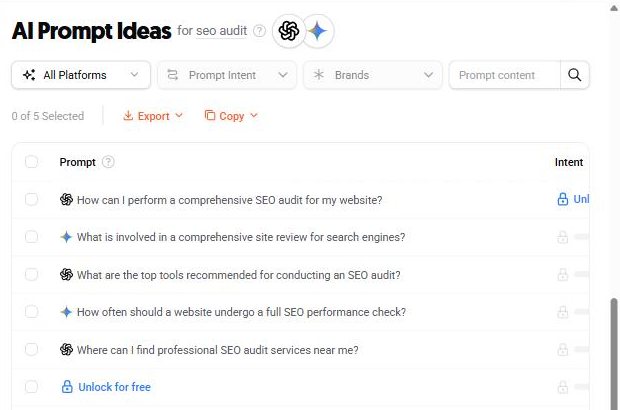
Ubersuggest is a practical start. Type your niche keyword and open AI Prompt Ideas: it lists the prompts the tool estimates people type into assistants about that topic (Ubersuggest help). They're estimates, not logs: use them as a list of questions to answer, not as numbers.
The five prompts in the screenshot, as text:
How can I perform a comprehensive SEO audit for my website?
What is involved in a comprehensive site review for search engines?
What are the top tools recommended for conducting an SEO audit?
How often should a website undergo a full SEO performance check?
Where can I find professional SEO audit services near me?
Without paying for a tool: your assistant for the draft, Google to confirm it
If you don't use Ubersuggest, your AI assistant can give you a draft of that list. Treat it as a hypothesis: what confirms what people search for are the queries Search Console already shows you in the Performance report.
My business: [what you sell, in one sentence]. City or country: [ ].Write 10 questions a client of mine would ask an AI assistant before hiring something like what I offer: 4 to understand their problem, 3 to compare options and 3 to decide.Write them the way a person would, not as keywords.Don't give me search volumes or percentages: you don't have them. If you're missing a fact about my business, write the questions anyway and tell me at the end which fact was missing; don't make it up.
Google gives you another list, for free. Search for your service and your city, and copy the questions in the “People also ask” box, if it shows up.
Copy what autocomplete suggests as you type, too. According to Google, autocomplete reflects real searches, although it doesn't simply show the most common ones.
I sell [service] in [city] to [type of client]. These are real questions I copied from Google: [paste them].Group them by what the person is trying to decide. Open my site, [URL], and the pages in its menu. To show you opened it, first copy the home page title exactly as it appears. Mark “missing” on the ones it doesn't answer today; for the rest, quote what you found and at which address.Don't invent search volumes or new questions: if you suggest any, label it “suggested, not verified”.If you can't open my site, say so in the first line and don't mark any as “missing”.
How many people search each question is a different job. Here's how I did it on a real site, with volume and difficulty: keyword research example.
Step 2: how do you get a site ready for AI answers?
With content that answers those questions through concrete claims and their sources, and with a site that doesn't get in the way.
The content has to be in the HTML (the text Google receives), and your name can't be confused with someone else's. The structured data (a card that describes your business to machines) has to match what's on screen. This is what I check:
Structured data that matches what's on screen
Person, service, articles and FAQs declared in the code, identical to what the page shows. Google's rule: don't mark up content that isn't visible to readers.
The free Rich Results Test checks whether your markup is valid for the result types Google supports. It doesn't check whether it matches what's on screen: that comparison is done by hand, like this:
From the browser · 3 min
Whether what your code declares matches what the page shows
Why it matters: Structured data describes your business to machines. If it says one thing and the page another, Google and AI assistants get a different version from the one your customer gets.
It's like a résumé versus the interview. If the résumé says “fluent Spanish” and the candidate can't speak it, they don't lose that point: they lose the whole trust.
Structured data is what a search engine or an assistant reads to know who you are and what you sell. If it declares something the page doesn't say, or the other way around, you're the one who loses. That match is part of what works to show up in AI Overviews.
- 1.
Open Google's Rich Results Test and paste your URL.
- 2.
Wait for the result and open each detected type.
- 3.
Compare each field against what your page actually shows: the price, the name, the address, the FAQs.
- 4.
If “FAQPage” shows up, it isn't an error. According to Google Search Central's documentation, Google stopped showing FAQs as a rich result on May 7, 2026. The markup still describes the page.
What comes out tells you which of these cases you're in.
It detects nothing.
Your site declares no structured data. It isn't an error; you just tell machines less than you tell people.
It detects types and every field matches the page.
Good. That's parity, and it's what Google asks for.
It detects fields that don't exist on the page.
An invented address, a price that isn't there, questions nobody sees. That's the typical output of an automatic generator, and it contradicts what the page shows.
Ask your AI assistant: the prompt to copy
Open it in your browser's side panel (Claude, Gemini or ChatGPT), with your page open, and replace what's in brackets. The rules at the end make it quote what it saw and say “not verifiable” instead of making things up.
This is the structured data of my page: [the “application/ld+json” blocks you found in “View page source”].Open the page [address] and compare each declared item —name, contact, services, price, author, questions— with what is on screen.If an item in the code doesn't appear on the page, say so.Rules for this review:1. Quote the exact text you found. Don't paraphrase it.2. If something can't be seen from the browser, write “not verifiable from the browser.” Don't assume.3. Give me a table: element · what you found · fine / review / missing · why it matters in one sentence.4. Don't make up traffic, visits or rankings. Don't promise anything will rank higher on Google.5. If you can't open an address yourself, say so in the first line and work only with what I pasted. Don't describe a page you didn't see.
What this check does NOT prove: The tool validates syntax and eligibility, not truth. Perfectly formed markup that says something false passes green.
When it's no longer a do-it-yourself job: the code declares things you don't recognize, or the fix requires editing files your platform doesn't show. I'll review your site for free and send it to you in writing.
An unambiguous entity
Your name, your service and your profiles connected, so no one confuses you with a similar person or company.
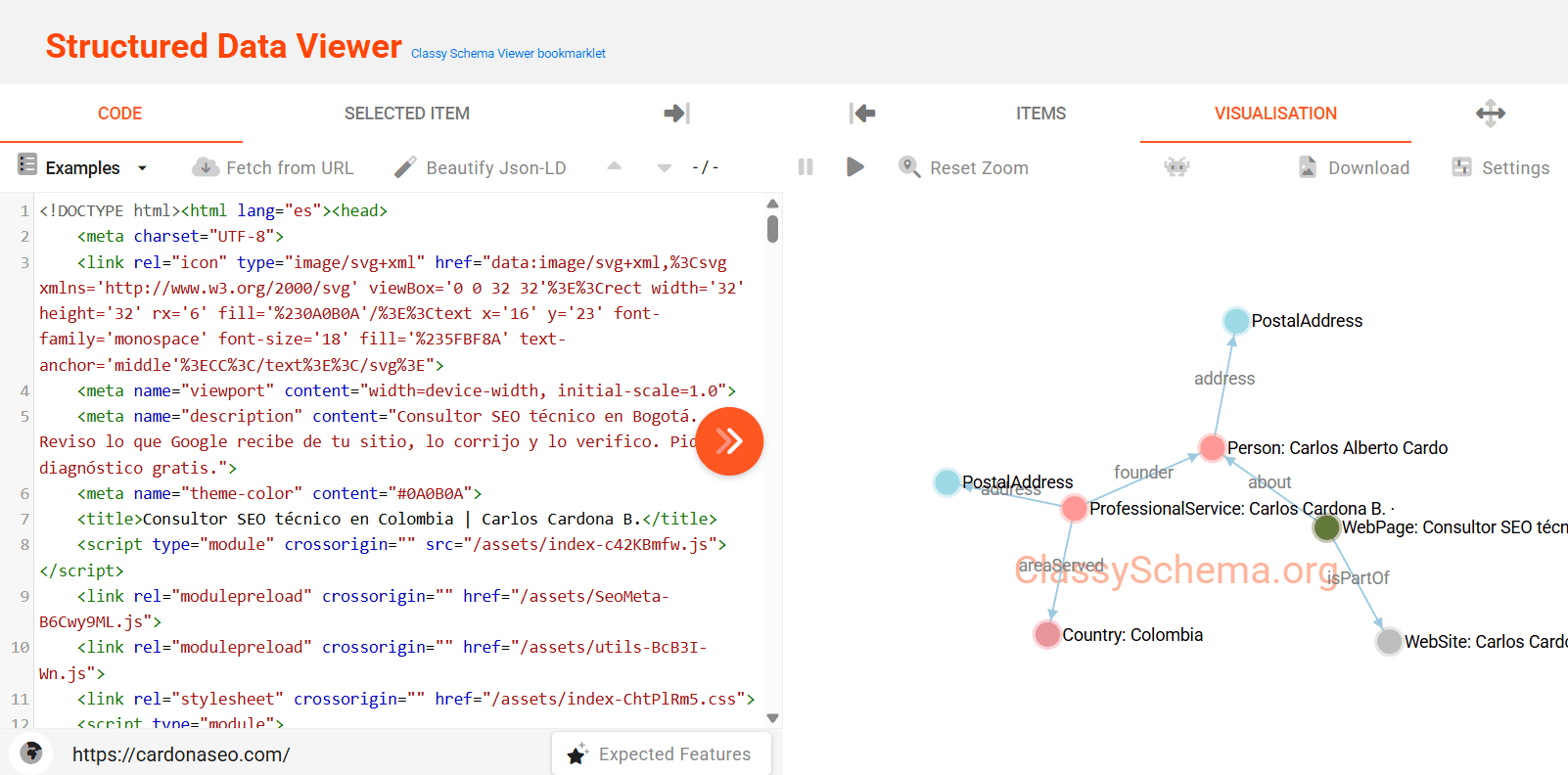
The graph a search engine reads from the home page. The person, the service, the page, the site and the country are joined by declared relations, not by chance. Screenshot added to the site on Sep 27, 2026; on Oct 2, 2026 the home page served the same types and relations.
It's reviewed as a graph and not as loose fragments. A valid entity with no edges is data nobody can connect to anything. That's the state of most sites that “already have schema.”
Content in the HTML
If your site assembles the page in the browser with JavaScript (the code that builds it), a crawler must run it to see the content. It's the first thing I check, exactly as in the technical SEO audit. What Google says in writing is further up.
If you write your copy with AI, Google sets two conditions in its guide on using generative AI content, updated on October 1, 2026. Generating many pages without adding value may violate its scaled content abuse policy.
And it asks you to manually fact-check everything the AI produced before publishing it, titles and descriptions included. For a prompt that writes them without making things up, see the next section.
If you asked an assistant about your service and it recommended a competitor, writing more isn't the first step. The first step is checking that it can read your page and tell exactly who you are: the two doors that depend on you. The free diagnostic checks whether your content reaches the HTML; the entity check is part of the technical audit.
AI Overview optimization: the two layers you can check today
A crawler reaching you, and your content being legible once it does. Neither depends on a model's opinion, and both can be checked from your browser.
Answer first. The question the page answers goes in the title and in the first paragraph, with the answer in two sentences. It serves the person and the assistant alike; Google doesn't ask you to chop content into pieces.
An entity with no ambiguity (nobody can mistake you for another person or business): who writes, under exactly what name, linked to official profiles. On this site the person node carries the surname initial because my father, Carlos Alberto Cardona O., has his own site.
Primary sources linked on every claim. That way the reader, and any assistant, can check what you say.
Parity between structured data and visible content. An auditor of mine scored 100/100 on FAQs that were hidden off-screen; I fixed it, and now it catches them.
Without a terminal: open View page source on the published page and search it for your answer sentence. If it isn't there, the answer isn't in the HTML, and no model can cite it. Then open your-site.com/robots.txt in the browser and check that it loads.
For whoever runs your site: the terminal version
curl -s -A "Googlebot" https://your-site.com/page | grep -c "your answer sentence"curl -s -o /dev/null -w "%{http_code}" https://your-site.com/robots.txt→ if the first returns 0, the answer isn't in the HTML: no model can cite it
Write three titles and three meta descriptions for this page: [address].Keyword: [ ]. What it's about, in two lines: [ ]. Who it's for: [ ].Use the keyword without forcing it and without superlatives you can't prove.Rules: don't make up figures, deadlines, guarantees or awards: if you're missing a fact, write [MISSING: which fact] instead of filling it in. If you can't open the page, write “I couldn't open [address]” in the first line and work only with what I pasted.
Before publishing one, check that the page delivers what the title promises. Google may rewrite the title and cut the description, so no character count guarantees it.

Step 3: how would you know your AI SEO is working?
You measure it with the instruments that exist today, and you write down what they can't see. There are three layers, from nearest to farthest: access, exposure and citation. Each one has a free source, so you can track all three without paying for a tool.
Each one has a limit worth noting next to the number, with the date of the reading.
Access: which AI robots reach your server?
Your server logs tell you. Cloudflare (a layer between visitors and server) shows them in its analytics even when your platform doesn't.
I measured it on this site on October 1, 2026, with Cloudflare's GraphQL analytics. From September 15 to 30, not one AI crawler requested llms.txt (an index meant for AI). The same crawlers asked for robots.txt (the rules for robots) and the sitemap (the list of your pages); ClaudeBot alone, 272 times (full numbers).
Exposure: how often did Google show you in an AI answer?
Search Console (Google's free tool that shows how Google sees your site) counts appearances in AI Overviews and AI Mode. It does so inside the Performance report, under the “Web” search type (Google Search Central).
On top of that, the generative AI performance report counts only impressions in AI Overviews and AI Mode: no clicks and no queries. According to Google's help page, re-read on October 4, 2026, it has been open to every site since August 31, 2026. It can be exported, and it carries the same 1,000-row limit as the Performance report.
The help page doesn't mention the API, and in the properties I read the API doesn't expose it. So it gets read by hand, with the date next to the number. How to read the rest of Search Console is in the Search Console guide.
Visits: how many arrive from an assistant?
In GA4, referral traffic from assistant domains is filtered by source, provided the property is configured properly (the Google Analytics 4 guide). One click from an assistant is a data point; ten aren't a trend.
Citation: which pages does an assistant cite?
AI Performance in Bing Webmaster Tools (Bing's equivalent dashboard) shows which pages Copilot, Bing's AI summaries and some partner services cite. It also gives its grounding queries: the phrases the AI used to retrieve content, not literally what the user typed (Bing Webmaster Tools). Bing Webmaster Tools also gives you an independent reading of whether your pages are crawled and indexed at all: one instrument isn't a measurement.
The cheapest way to measure it on the other assistants is to ask yourself, always the same way. One answer on its own isn't data, because it changes from one day to the next. The same question, asked every month and logged with the date, the assistant and the country, does show you a direction.
A SparkToro study, published on January 27, 2026, backs this up. In it, 600 volunteers asked ChatGPT, Claude and Google's AI 12 questions, 2,961 times in all. On ChatGPT and Google's AI, the chance of getting the same list of brands twice was under 1 in 100.
Its author concludes that the share of answers in which a brand appears, across many repeated prompts, is a reasonable measure.
So log whether it cited you rather than in what position, and if you can, ask the question several times on the same day.
It also tells you something no tool will: whether the assistant mixes you up with another person or company with a similar name. Open every address it cites, because assistants make up links too.
Answer the way you would for any user, searching the web if you can: [the question a client of yours would ask, e.g. “who does technical SEO audits in [your city]?”].Then, separately:1. Did you search the web to answer?2. The addresses you cited, in full.3. Does [your brand or your domain] appear? Quote the sentence.4. Did you mention anyone with a name similar to [your name or your business's]?Don't make up addresses. If you didn't search the web, say so in the first line.
Log each time the date, the assistant, whether you were signed in, the country, whether it cited you and the address it cited. If you change the question, you start a new log.
Layer three: what nobody controls, and what gets sold instead
Whether the generated answer cites you is decided by a model at query time, for a query you didn't choose, against competitors you can't see. Nobody sells a guarantee on that honestly. What does get sold instead:
The llms.txt file is an open proposal for models to read a summary of the site. Google Search doesn't use it, with the source, in the llms.txt article. This site serves one because it costs nothing and doesn't contradict the sitemap, not because it ranks.
“ChatGPT optimization” as a separate technical service doesn't exist either: assistants with search read the same HTML Google reads. If the HTML reaches Googlebot empty, it usually reaches the others empty too.
And the AI visibility improvement percentages being sold can't be measured with the Search Console API. It counts AI Overviews and AI Mode inside the web totals, without separating them. What can be measured is in step 3, and how I apply this as a service, in AI SEO.
Where I think this is going
Here's where I think this is going. According to Search Engine Journal (September 14, 2026), Google is testing payments to publishers when their content contributes significantly to an AI answer. It's a pilot, but it points somewhere I believe in: attention is getting cheap, and trust is getting expensive.
What I don't claim
I can't tell you how often you appear in AI Overviews for a query that matters to you, and Google doesn't report it either. The API doesn't separate it, and the interface report has no query data. Outside tools can only sample it, so any agency quoting you a percentage there is quoting you something Google didn't measure.
I haven't run a controlled test of whether answer-first structure changes citation rate. Nobody I have read has either, at a sample size worth the name.
What I can say is that a page whose answer is missing from the served HTML can't be cited at all. And checking that takes a command, not an opinion.
So the honest offer is layers one and two, verified, and layer three left where it belongs: outside anyone's control. If you want that checked on your site, the free diagnostic starts there.
Watch it explained, by the people who built it
Two videos from Google's own channels. They're the same source the links above point to, in video form:
How AI Is Changing Google Search and SEO · Google Search Central, 33 minutes, May 2026. Martin Splitt with a Google Search engineering director.
AI features in Search and your site · Google Search Central, 7 minutes, July 2025. A quarterly roundup that opens with how a site becomes eligible to appear in AI features.
Frequently asked questions
No. Google says there are no additional technical requirements. The page has to be indexed and eligible to be shown in Search with a snippet, like any other. And the site can't be excluded in Search Console, which includes it by default.
Not for Google Search, which doesn't use it. I explain why, with Google's source and my own logs, in the llms.txt article.
Google doesn't forbid it: its guidance says generative AI can help when researching a topic or structuring original content. What it warns against is generating many pages without adding value, which may violate its spam policy on scaled content abuse.
Not reliably. Google says there are no additional requirements or special optimizations for AI features, and its spam policies still apply. What you can do is make sure your page reaches it complete and says something worth citing.
Search Console's generative AI report counts impressions, with no clicks or queries, and GA4 shows referral traffic from assistant domains. Your access log also shows each assistant's crawler by name. One click is a data point, not a trend.
Sources
Article reviewed on October 18, 2026. Each date is the source's last published update.
See the 23 sources
- 01How AI Is Changing Google Search and SEO · Google Search Central · video
- 02AI features in Search and your site · Google Search Central · video
- 03AI features and your website · Google Search Central
- 04Optimizing your website for generative AI features on Google Search · Google Search Central
- 05Introduction to structured data markup · Google Search Central
- 06Introduction to robots.txt · Google Search Central
- 07The /llms.txt file · llmstxt.org
- 08Generative AI performance report (Search) · Search Console Help
- 09Search generative AI control · Search Console Help
- 10Overview of OpenAI Crawlers · OpenAI
- 11Does Anthropic crawl data from the web, and how can site owners block the crawler? · Anthropic · Claude Help Center
- 12Google's common crawlers (Google-Extended) · Google Search Central
- 13Google Search's guidance on using generative AI content on your website · Google Search Central
- 14Google Search Central documentation updates · Google Search Central
- 15Ubersuggest AI Keyword Overview: A Complete Guide · Ubersuggest Help Center
- 16How Google autocomplete predictions work · Google Search Help
- 17General structured data guidelines · Google Search Central
- 18Rich Results Test · Google Search Console
- 19Understand JavaScript SEO basics · Google Search Central
- 20Cloudflare Analytics · Cloudflare Docs
- 21Introducing AI Performance in Bing Webmaster Tools Public Preview · Bing Webmaster Blog · Feb 10, 2026
- 22AIs are highly inconsistent when recommending brands or products · SparkToro · Jan 27, 2026
- 23Google Tests Paying Publishers For AI Answers Via Search Console · Search Engine Journal · Sep 14, 2026
About the author. Carlos Alberto Cardona B., SEO specialist in Bogotá. I write what I measure, with every number next to its instrument and date, and I verify what AI executes myself.